
Over time, Windows PCs become slow as you use them. Junk files, unnecessary startup programs, outdated drivers, and background processes can slow performance. As a result, everyday tasks may take longer, applications can become unresponsive, and overall productivity may suffer. This is where PC optimization software like Advanced SystemCare comes into play. It promises to clean out unnecessary files, optimize system settings, boost performance, and add security features. But does it really deliver these benefits? In this article, we’ll explore real user experiences, examine its key features, and determine whether Advanced SystemCare lives up to the hype.
Part 1: What is Advanced SystemCare?
IObit Advanced SystemCare is a PC cleaner and optimization software designed to improve Windows performance and keep computers running smoothly. It offers a collection of tools that help users remove junk files, clean registry entries, manage startup programs, and optimize system settings. One of the standout features of this program is that it includes an intuitive interface, which enables users to optimize their PC performance without any professional help or technical knowledge. Additionally, Advanced SystemCare provides automated maintenance options, allowing users to scan their systems and identify potential performance issues with just a few clicks. It also includes tools for protecting online privacy, cleaning browsing traces, and monitoring system performance.
Part 2: Key Features That Make Advanced SystemCare Worth It
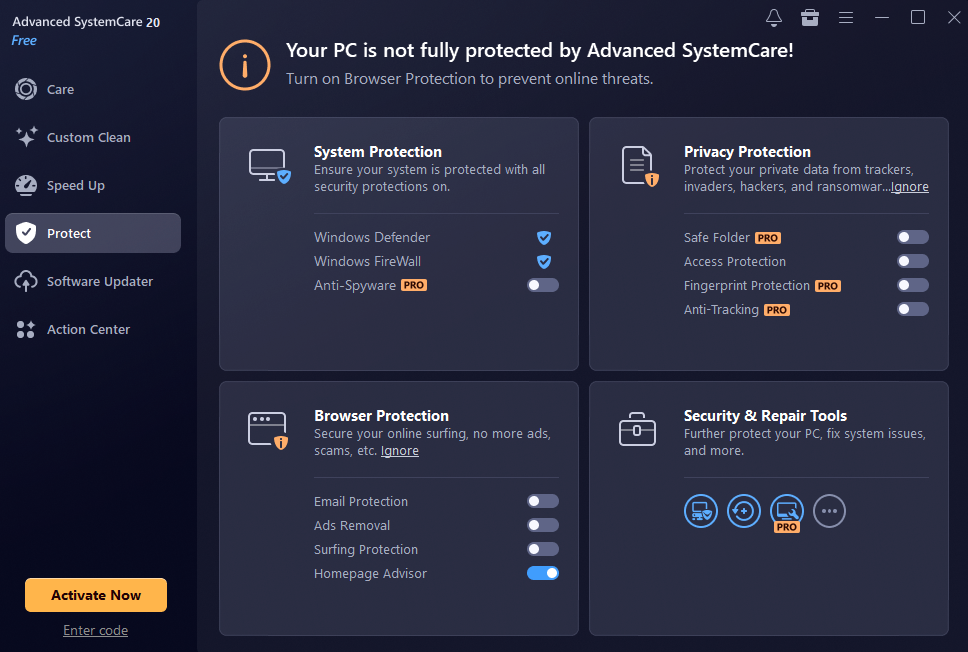
Advanced SystemCare offers a wide range of amazing features that help users clean, optimize, and maintain their Windows PCs without going through a complicated manual process. Here are Advanced SystemCare’s standout features:
- Fast and Deep Cleaning: Over time, your computer accumulates massive volumes of useless, temporary, duplicate, and large files that may slow down your system performance. Advanced SystemCare helps identify and remove these unnecessary files to free up valuable disk space and keep your PC running smoothly.
- Ultimate Performance Optimization: Say goodbye to slow downloads, video stuttering, and system freezes. Advanced SystemCare maximizes system and network efficiency through cutting-edge technologies designed to improve overall PC responsiveness.
- Fortified Security: Beyond performance, Advanced SystemCare acts as a powerful guardian for your device, keeping your system secure and your digital footprint hidden from prying eyes. It includes privacy protection tools designed to clean browsing traces, remove tracking data, and reduce the exposure of sensitive information.
- 20+ Practical Tools: Advanced SystemCare’s capabilities extend far beyond the features above. Packed with over 20 handy tools, such as Registry Cleaner, Disk Cleaner, Large File Finder, App/Extension Cleaner, Real-Time Protection, DNS Protector, Turbo Boost, Internet Boost, and more.
- Intuitive Interface: As mentioned earlier, one of the standout features of IObit Advanced SystemCare is that it offers an easy-to-use interface, which is ideal for non-tech and beginner users. Its clean and well-organized dashboard makes it simple to access different cleaning, optimization, and security tools without any difficulties.
Part 3: Pros and Cons of Advanced SystemCare
The program is filled with advanced features that make it one of the best tools to improve Windows performance and keep the computer running smoothly. However, it also comes with certain limitations. Here are the top pros and cons of Advanced SystemCare:
Pros
- One-click and AI-driven optimization make maintenance effortless.
- The beginner-friendly interface allows users to clean and optimize their PCs without technical knowledge.
- Multiple cleaning tools help remove junk files, temporary data, and unnecessary system clutter.
- Works seamlessly with all Windows versions, including Vista, XP, Win 7, Win 8, Win 8.1, Win 10, and Win 11.
- Offers a free version, which enables users to clean junk files and optimize PC performance without spending a single penny.
Cons
- IObit Advanced SystemCare also offers a paid version, which offers more advanced features compared to Advanced SystemCare.
See also: How to Choose a Custom Automation Machinery Partner in the US: A Plant Engineer’s Checklist
Part 4: Step-by-Step Guide: How to Use Advanced SystemCare
Advanced SystemCare offers an easy-to-use interface, which makes the optimization process simple. Here is how to use Advanced SystemCare:
- Navigate to the Advanced SystemCare official site and download the latest version of the program on your PC. Launch it and select the “AI Mode” from the main interface.
- Click on the “Scan” button to begin the scanning process. The software will automatically examine different areas of your computer to identify junks file.
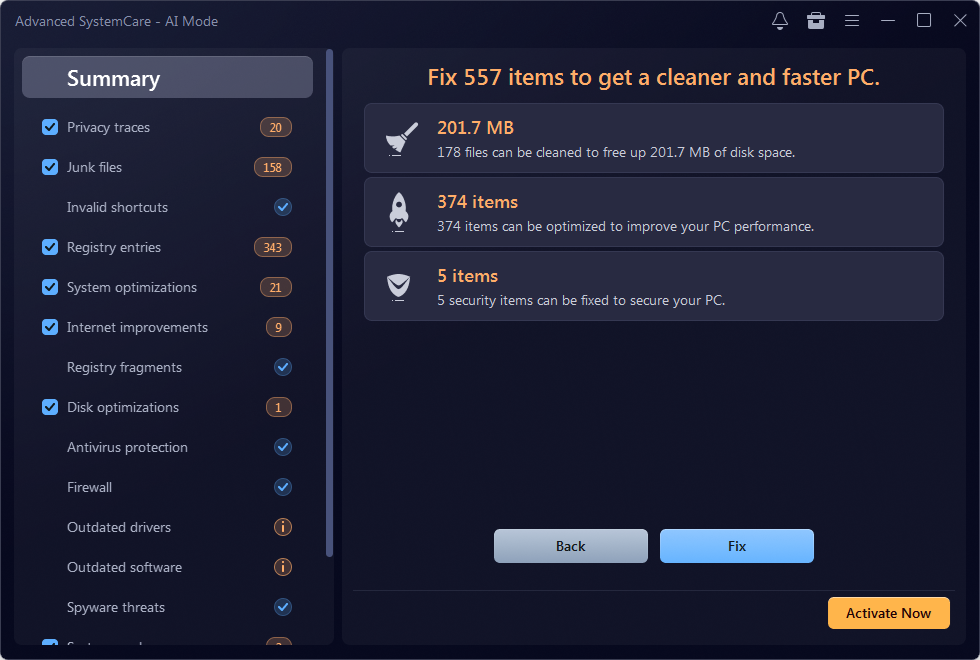
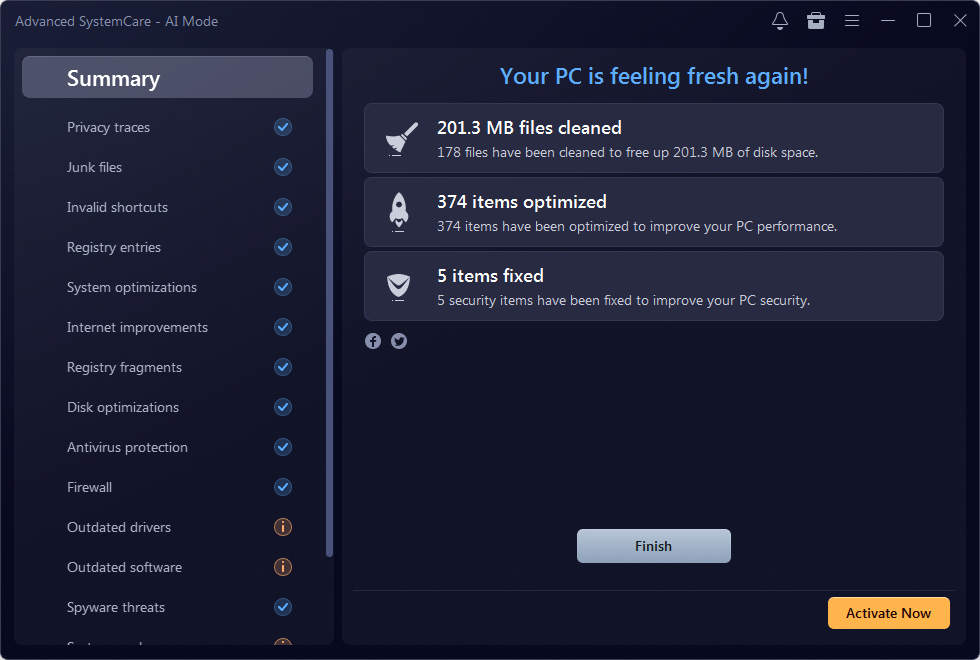
- Once the scan is complete, review the results displayed on the screen. Click on the “Fix” button to let the software clean the detected junk files and apply the recommended optimization settings.
Part 5: FAQs Related to Advanced SystemCare
Is Advanced SystemCare Safe to Use?
Yes, Advanced SystemCare is a PC optimization tool developed by IObit, a well-known company that offers various Windows maintenance and security utilities.
Does Advanced SystemCare Automatically Clean Junk Files?
The program offers an “AI Mode,” which automatically scans for junk files, unnecessary data, and other potential performance issues. Once the scanning is complete, click on the “Fix” button to clean the junk files without any manual effort.
Final Thoughts
IObit Advanced SystemCare is one of the best PC cleaning and optimization tools for users looking to maintain their Windows computers without dealing with complicated manual processes. It offers a variety of features, including junk file cleaning, performance optimization, privacy protection, and more.